
Medicaid is Changing
New Health First Colorado (Medicaid) coverage rules are coming later in 2026 and 2027. These changes will affect immigrants and some adults ages 19–64. Learn more(opens in a new tab).
Get help understanding health coverage, payment options, and programs that may make care more affordable.
Peak Vista Enrollment Services can help with Medicaid, CHP+, the Sliding Fee Scale Discount Program, and other enrollment needs. Review the steps below before you schedule or visit so you know what to bring and where to go.
Taking these steps in order can help you arrive prepared and make better use of your time with Enrollment Services.
Learn which coverage, enrollment, and payment needs Enrollment Services supports.
Go to Step 1 ↓Gather the information and documents that apply to your situation.
Go to Step 2 ↓Follow all of the MyChart steps to fully schedule your Enrollment Services appointment. Once you are prepared, schedule your appointment.
Go to Step 4 ↓Enrollment Services can help you understand coverage, payment programs, and other steps that may help you access care.
Get help with applications, coverage questions, updates, and enrollment steps related to Medicaid and CHP+.
Learn About Insurance & Medicaid → (opens in a new tab) (opens in a new tab)Learn about discounts that may lower what you pay for Peak Vista services based on household size and income.
Explore the Sliding Fee Program & Get Answers to Questions → (opens in a new tab) (opens in a new tab)Get help with enrollment questions, coverage changes, and next steps for you or your family.
Information for New Patients → (opens in a new tab) (opens in a new tab)Bring the information and documents that apply to you. Having the right information helps Enrollment Services use your visit to complete as much of your request as possible.
If you are missing documents needed for your situation, Enrollment Services may not be able to finish your request during your visit.
You will complete the needed forms during your Enrollment Services visit. Staff will guide you through the process.
Review the location information below before you visit. Bring the documents listed above with you.
3207 N. Academy Blvd., Suite 1500
Colorado Springs, CO 80917
8:00 a.m. – 5:00 p.m.
Appointments are required.
2828 International Circle, Suite 120
Colorado Springs, CO 80910
8:00 a.m. – 5:00 p.m.
Appointments are required.
350 Lyckman Dr.
Fountain, CO 80817
8:00 a.m. – 5:00 p.m.
Appointments are required.
225 S. Union Blvd.
Colorado Springs, CO 80910
8:00 a.m. – 5:00 p.m.
Appointments are required.
Once you have gathered all required documents and know where you want to go, schedule an Enrollment Services appointment through MyChart. You do not need to have a MyChart account created.
Choosing a date and time does not finish scheduling your appointment. Keep following the MyChart steps until you see a confirmation that your appointment is scheduled.
Using another language? Some Peak Vista appointment names may still appear in English, even when MyChart is showing another language. Review the guide below before you begin.
MyChart has a few steps that can be easy to miss. Review this guide before you begin, especially if you use another language or do not have a MyChart account.
Follow the steps below. Do not close MyChart after choosing a date and time. Your appointment is not scheduled until you finish the full process.
MyChart will first ask what type of Enrollment Services appointment you need.
Even if you selected another language, you may still see these appointment names in English:
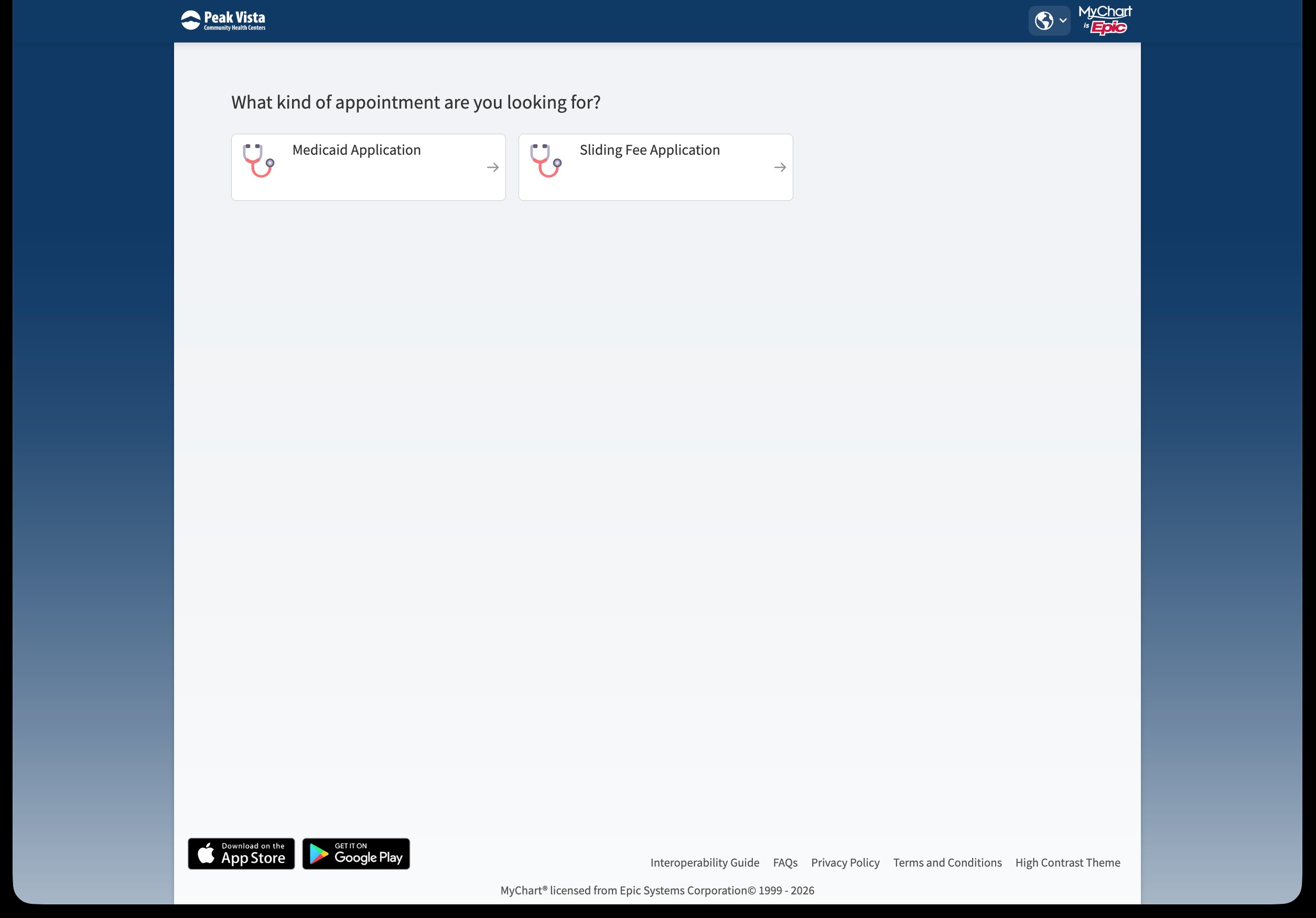
Select the available appointment that works best for you.
MyChart may also ask you to complete a security check before you can continue.
Your appointment is NOT scheduled yet.
MyChart may show your appointment type, date, time, and location before scheduling is finished. Do not close the page.

Choose the option to log in and keep scheduling.
Choose Continue as guest. Then choose whether you are scheduling for yourself or someone else.
If you continue as a guest, MyChart will ask for information about the person receiving Enrollment Services.
Complete the required fields and keep following the MyChart instructions.
MyChart will show your appointment information again before scheduling is complete.
Review the details, then select the button at the bottom of the screen to continue and finish scheduling.
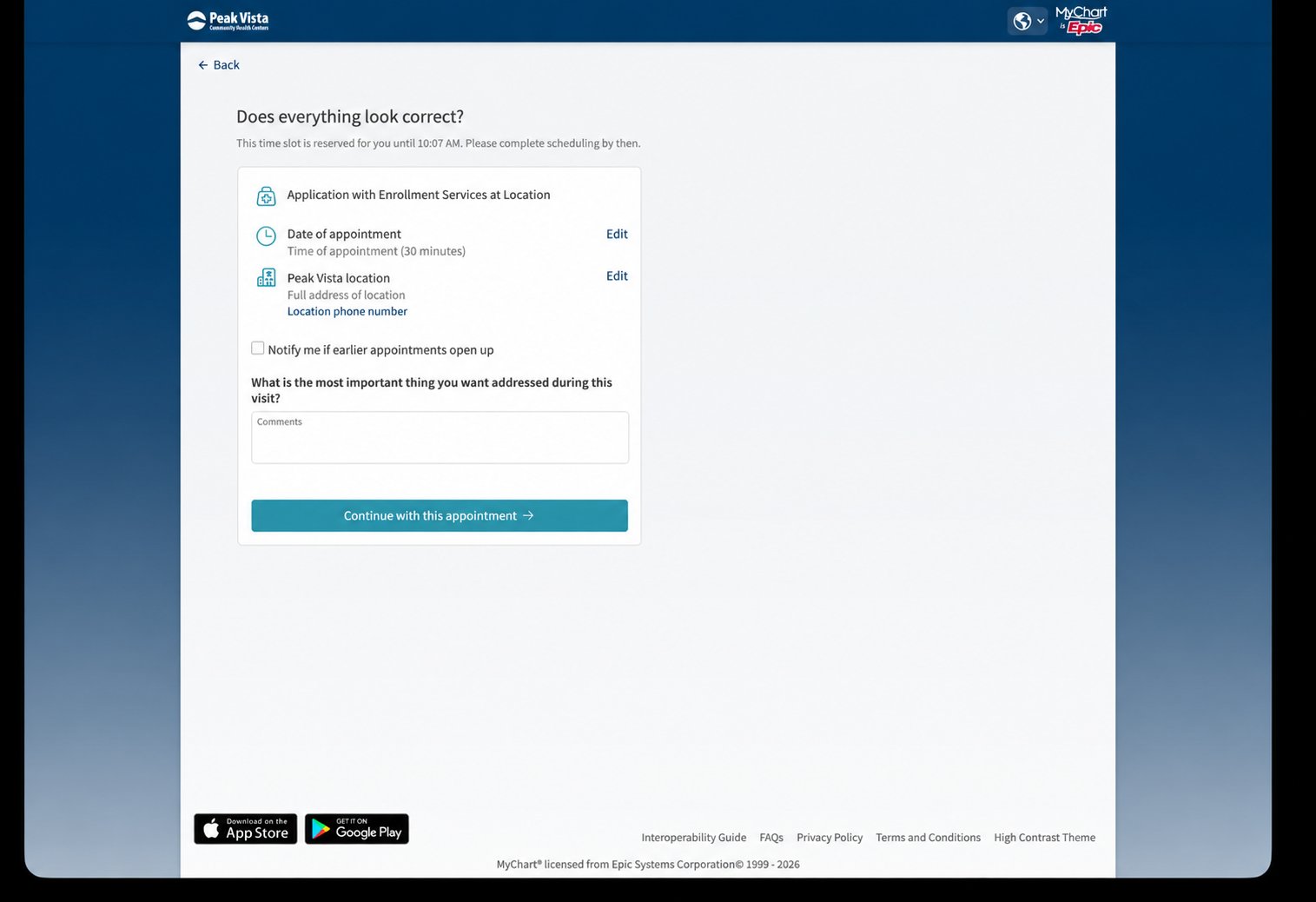
You are finished when MyChart confirms that your appointment is scheduled.
Look for the green “Scheduled appointment” message before you close MyChart.
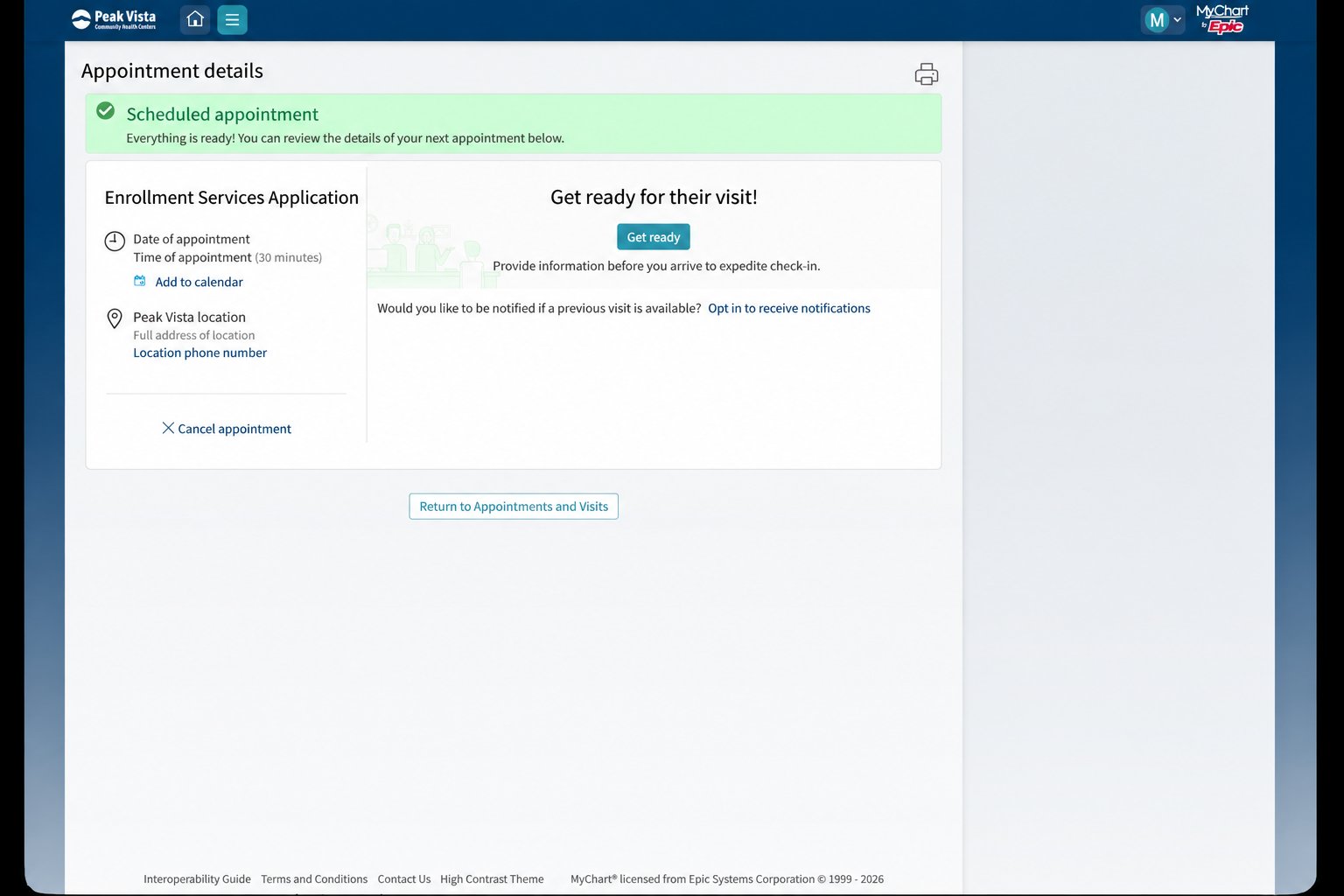
Make sure you have reviewed the preparation information and MyChart scheduling guide above before you begin.
Remember: Choosing a date and time does NOT finish scheduling. Continue until MyChart confirms that your appointment is scheduled.
Call the Peak Vista Customer Service Center at (719) 632-5700.
Use these resources to learn more about coverage, preparing for care, and support available at Peak Vista.
Learn about insurance, Medicaid, and current Peak Vista coverage information.
Explore Insurance & Medicaid →Learn how to prepare for a Peak Vista appointment and what you may want to bring.
Prepare for Your Visit →Learn about language assistance, interpretation, and other support available at Peak Vista.
Explore Accessibility & Interpretation →Find quick answers about Enrollment Services, coverage help, and what to expect.
For general questions, call the Peak Vista Customer Service Center at (719) 632-5700. To schedule an Enrollment Services appointment, use the online scheduling link above.
Appointments are required so that our team is able to help you on the day of your choosing.
Bring the documents that apply to your situation either way. Review the current location information above before you go.
Bring the information that applies to you, including:
Review the preparation section above before your visit.
Yes. Enrollment Services can help with Medicaid and CHP+ applications, coverage questions, and enrollment steps.
You can also visit our Insurance & Medicaid Guide(opens in a new tab) for more information.
Yes. Enrollment Services can help you understand the Sliding Fee Scale Discount Program and the information you may need to apply.
Visit the Sliding Fee Scale Discount Program Guide(opens in a new tab) to learn more before your visit.
You may still have options for care and help paying for services. Enrollment Services can help you understand programs that may apply to your situation.
Learn more on our Insurance & Medicaid Guide(opens in a new tab).
Yes. Peak Vista offers language assistance and interpretation support for those who need it.
Visit our Accessibility & Interpretation Guide(opens in a new tab) to learn more.
Call the Peak Vista Customer Service Center for general help and directions.