
Skip Navigation
Skip Main Content

What is Telehealth at Peak Vista?

Meet with your provider from the comfort of your home.

Telehealth lets you meet with your Peak Vista provider from home, work, or anywhere you have internet. You can use your smartphone, tablet, or computer for your visit. For your privacy and safety, choose a private, secure location—avoid public spaces or other areas where your personal information could be exposed.

We offer telehealth for:

  • Medical care
  • Behavioral Health care
  • Dental care (Teledental)

Medical and Behavioral Health telehealth visits use the Nextgen Virtual VIsits platform. Dental telehealth uses Teledental by Mouthwatch. Both options are private, safe, flexible, and easy to use.

Why Patients Love Telehealth

Telehealth makes getting care easier and more flexible than ever. Whether you need a follow-up, a check-in about a chronic condition, or behavioral health support, you can meet with one of our providers without leaving home.
  • Convenience: Meet your provider from anywhere. Skip the travel and the waiting room.
  • Safety: See your provider in a private, secure space—very helpful during flu season.
  • Access: Receive timely care even if you cannot get to a health center.
  • Continuity: Keep up with follow-up visits and chronic condition care without missing appointments.
  • Family-Friendly: Parents and caregivers can fit visits into busy days more easily.

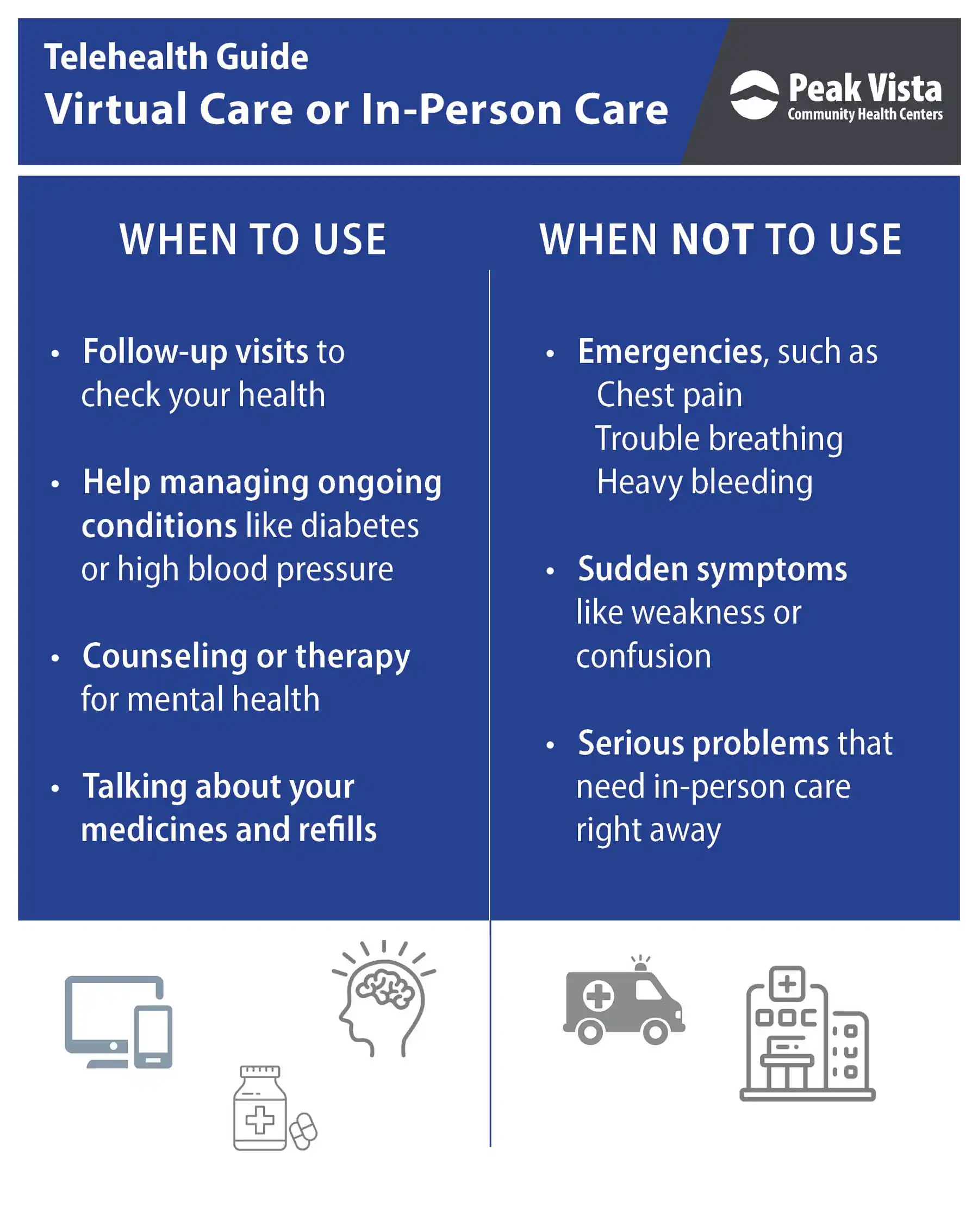
82525_Telehealth_Infographic_When_to_Use_Not_Use.jpeg

Medical & Behavioral Health Telehealth (Nextgen Virtual Visits)

With Nextgen Virtual Visits, you can have a secure video visit with your doctor, nurse, or counselor. Here’s how it works:

  1. Schedule your appointment: Call us at (719) 632-5700.
  2. Get your link: We'll send instructions by email or text. You will receive one secure link for your appointment.
  3. Check your device: Click the link before your appointment to make sure your camera and microphone work. Testing ahead of time helps prevent delays.
  4. Join your visit: At your scheduled appointment time, click the same link again to access your telehealth visit.
  5. Get care: Talk with your provider just like you would in person, and follow any instructions they give.

Telehealth can be a great choice for children’s medical and behavioral health visits. It helps families get care without interrupting school or work. Pediatric telehealth visits can include care for minor illnesses and follow-up visits.

To help families balance screen time and technology use, read our Guide to Understanding Screen Time for Kids and Adults for tips and resources.

Telehealth for Dental Care (Teledental)

Teledental at Peak Vista lets you connect with a dentist through secure video to get quick advice, check dental problems, and plan your care — often without an in-person visit. We use TeleDent, a HIPAA-compliant teledentistry platform, so your dental team can safely review photos, x-rays, notes, and other records to give you the best care possible.

While your dentist cannot poke around your mouth over video, they can see your teeth and gums, listen to your symptoms, decide what is likely going on, and prescribe medicine for infections when it is safe to do so. In many cases, this saves you time and a trip to the dental chair.

What Teledental Can Help With

Teledental is a good option for many dental concerns that do not need immediate hands-on treatment. It helps you get expert advice quickly and know your next steps.

  • Tooth pain or swelling
  • Pediatric dental care, including toothaches, cavities, and tips for healthy brushing and eating habits
  • Urgent dental questions before weekends or holidays
  • Treatment planning, including talking through tests, x-rays, and follow-up needs
  • Prescriptions for dental infections, when needed and safe

Behind the scenes, TeleDent lets your dental team securely share images, notes, and treatment plans so everyone on your care team is on the same page.

How Teledental Works

Our Teledental process is simple and designed to get you the right care fast — either at home or at the health center if needed. Learn how to Prepare for your Teledental appointment(opens in a new tab).

  1. Schedule your visit: Call your dental clinic to request a Teledental visit.
  2. Get your Teledental link: We will send secure login details by text or email.
  3. Connect online: Use your computer, tablet, or smartphone to join your video visit.
  4. Show your smile on camera: Use your camera to show your teeth and gums so the dentist can see what is going on.
  5. Next steps: Get care instructions, an in-person appointment, or — if your condition needs advanced treatment like certain extractions, root canals, or wisdom teeth removal — a referral to the right dental specialist.

TeleDent runs in a web browser and works on most modern computers, tablets, and smartphones that have a camera, microphone, and reliable internet connection.

Read about Oral Health: An Important Part of a Child’s Wellness.

Is Teledental Secure?

TeleDent uses strong encryption and other safeguards to keep your dental information safe. Only authorized members of your care team can see your records, images, and visit notes.

Helpful Resources & Frequently Asked Questions

Scheduling a telehealth appointment at Peak Vista is quick and simple. You can get the care you need without leaving home. Whether it is your first visit or a follow-up, you will get all the information you need to prepare.

  1. Call (719) 632-5700.
  2. Receive confirmation and visit link by email or text.
  3. Prepare your device and join your visit on time.

Peak Vista accepts most major insurance plans for telehealth, including Medicaid and Medicare. If you do not have insurance, you may qualify for sliding scale fees based on your income. Our Enrollment Services team can help you understand your options and find affordable care.

Telehealth & Medicare

  1. Medicare patients can receive medical telehealth visits by video or telephone through the end of January 2026.
  2. This applies to Medicare Fee-for-Service and Medicare Advantage plans.
  3. Telehealth for non-medical services remains unchanged.

For more details on enrollment, payment, and assistance, visit our Enrollment Services page.

Our secure telehealth and Teledental platforms let you meet with your provider by video on your computer, tablet, or smartphone. It’s designed to keep your visit private, safe, and simple.

Tips for a smooth visit:

  • Keep your device and web browser updated.
  • Allow your browser to use your camera and microphone.
  • Use a strong, private Wi-Fi or cellular connection.
  • Test your device before your appointment (your appointment link includes a test option).
  • If you have issues, try switching internet networks or devices.
  1. Can Medicare patients use Telehealth??
    Yes. Medicare patients can receive medical telehealth visits by video or telephone through the end of January 2026, including Medicare Fee-for-Service and Medicare Advantage plans. Telehealth for non-medical visits has not changed.

  2. Can my provider prescribe medication after a telehealth appointment?
    Yes, your medical, dental, or behavioral health provider may prescribe medication during your telehealth visit if it is safe and appropriate. Prescription is not guaranteed and depends on the discussion you have with your provider during your appointment.

  3. Is it better to use a computer or a phone for telehealth?
    Both devices work, but for the best experience, you must use: a computer with a webcam OR a smartphone or table with a front-facing camera.

  4. I'm not tech-savvy, is telehealth for me?
    Yes! We give clear, step-by-step instructions and support to help you get connected—whether your visit is with medical, dental, or behavioral health.

  5. What if I don't have insurance?
    You can still access telehealth services. Contact us to learn about payment options.

  6. How do I cancel or reschedule my telehealth appointment?
    Call our office at (719) 632-5700 .

  7. How can my provider treat me without a physical exam?
    Telehealth is for cases where an in-person exam is not required. Often, a provider can determine a treatment plan based on your questions, medical history, and symptoms. Your provider will tell you if you need to come in for a medical procedure, dental treatment, or behavioral health follow-up.

  8. Is my medical information secure during telehealth?
    Yes. Our medical, dental, and behavioral health telehealth platforms use secure, encrypted connections protect your private information.

  9. What if I have technical difficulties during my visit?
    Refer to our troubleshooting guide above or call (719) 632-5700 for assistance.

Our team of medical, behavioral health, and dental providers is ready to meet with you virtually. They offer the same caring, expert service you expect from Peak Vista — now from wherever you are.

Explore the list below to learn more about your telehealth care team.

Provider Card image cap

Bhavna Bali, MD

Pediatrician
Provider Card image cap

Elizabeth Barron, PAC

Physician Assistant
Provider Card image cap

Molly Dinnen, DNP

Medical Director of Health Informatics & Clinical Integration
Provider Card image cap

Jennifer Linden, PAC

Physician Assistant
Provider Card image cap

Michael Swain, NP-C

Nurse Practitioner